How do I read the Map view?
In the Map view you can explore our operations and supply chain across the on an interactive world map, making it easy to see where we operate and how different locations connect.
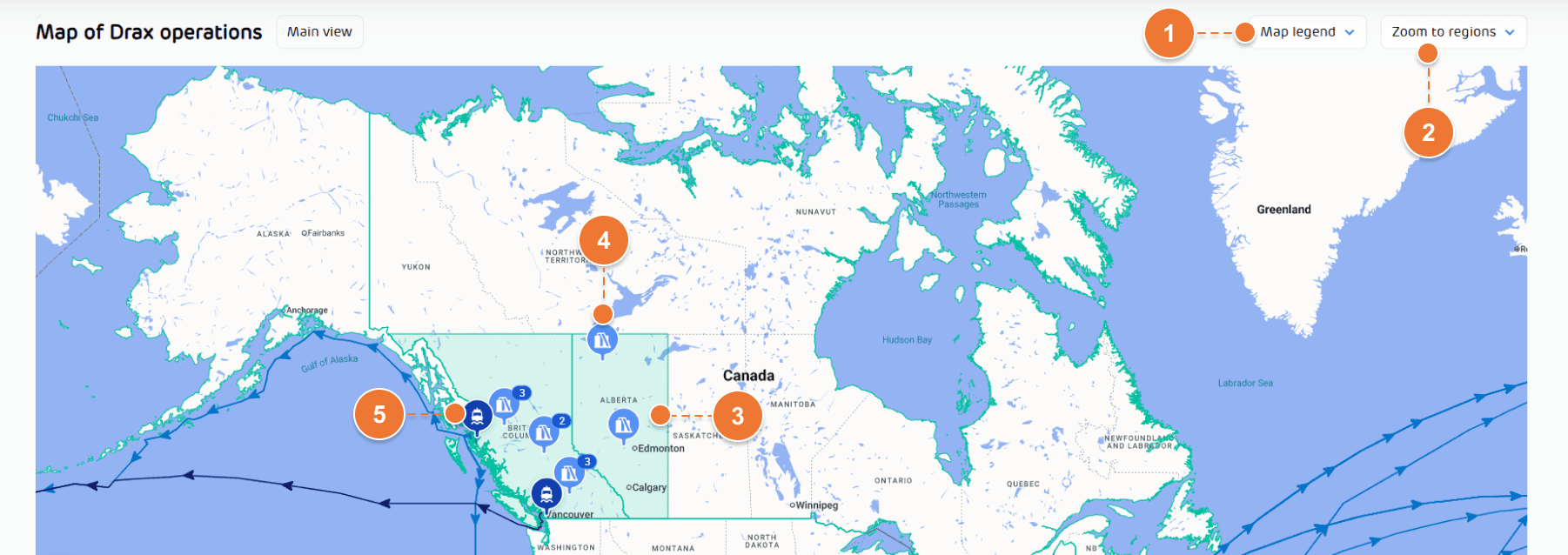
Use the ‘Map legend’ (1) and ‘Zoom to regions’ (2) menus to explore different parts of our supply chain.
Areas on the map highlighted in green show where we operate. You can also zoom directly into the map, select a region (3), site (4) or port (5) to find out more.
Use the date selector at the top of the page to switch between available quarterly reporting periods. The selected quarter refers to when the biomass was either used at Drax Power Station or sold to third party buyers.
Earlier stages of the biomass journey, such as pelletising and transportation, may have taken place before the selected quarter.
Use the ‘Map legend’ (1) and ‘Zoom to regions’ (2) menus to explore different parts of our supply chain.
Areas on the map highlighted in green show where we operate. You can also zoom directly into the map, select a region (3), site (4) or port (5) to find out more.
Use the date selector at the top of the page to switch between available quarterly reporting periods. The selected quarter refers to when the biomass was either used at Drax Power Station or sold to third party buyers.
Earlier stages of the biomass journey, such as pelletising and transportation, may have taken place before the selected quarter.